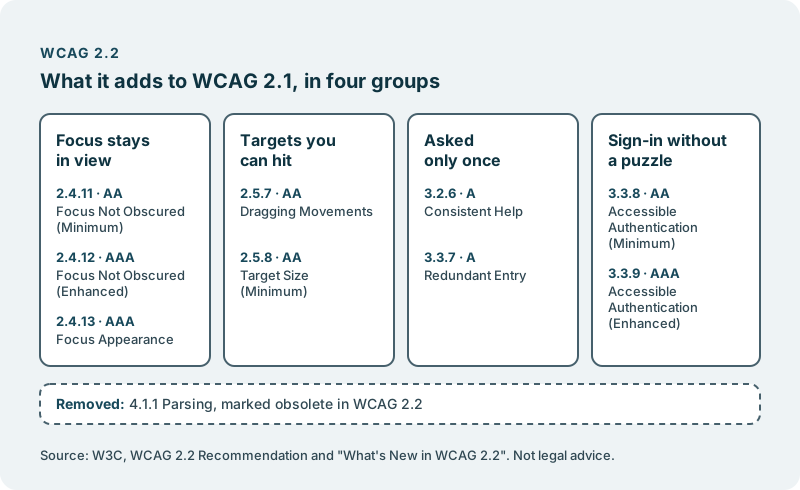
- WCAG 2.2 adds nine success criteria to WCAG 2.1 and removes one, according to the W3C.
- Six of the nine are at level A or AA. In plain terms they ask for focus that stays in view, targets you can hit, information you give only once, and sign-in without a puzzle.
- They land where people get things done: moving through a page, signing in, filling in a form, getting help.
The Web Content Accessibility Guidelines are the W3C’s standard for making web content usable by people with disabilities. Version 2.2 became a W3C Recommendation on 5 October 2023. If your team already works to 2.1, most of what you know still holds. The new parts are small in number and sharp in where they land.
Nothing below is legal advice, and nothing here says whether your product conforms to any version. That is for you and your advisers to judge. If a law, a contract or a tender names a version of WCAG, read that text itself to see which one. What follows is what the W3C’s own pages say, in plain terms, with the link next to each fact.
What changed between 2.1 and 2.2
Nine criteria were added, and one was taken away.
The W3C’s page What’s New in WCAG 2.2 lists the additions. Two are at level A: 3.2.6 Consistent Help and 3.3.7 Redundant Entry. Four are at level AA: 2.4.11 Focus Not Obscured (Minimum), 2.5.7 Dragging Movements, 2.5.8 Target Size (Minimum) and 3.3.8 Accessible Authentication (Minimum). Three are at level AAA: 2.4.12 Focus Not Obscured (Enhanced), 2.4.13 Focus Appearance and 3.3.9 Accessible Authentication (Enhanced).
The removal is 4.1.1 Parsing, which the W3C marks as obsolete in 2.2. The other success criteria of 2.1 carry over into the 2.2 Recommendation.
Focus that stays in view
A person who moves through your product with a keyboard has to see where they are.
Under 2.4.11 Focus Not Obscured (Minimum), when a component receives keyboard focus, it is not entirely hidden by content the author created. Think of a sticky header, a chat button or a cookie banner that sits over the field a person has just tabbed to. At level AAA, 2.4.12 asks that no part of the focused component is hidden, and 2.4.13 Focus Appearance sets a size and contrast for the focus indicator itself.
For a product leader, this one is easy to break without noticing. The elements that cover focus are often added for good reasons, by people who never test with a keyboard.
Targets you can hit
Buttons and links have to be large enough, or far enough apart, for people who cannot point precisely.
2.5.8 Target Size (Minimum) asks that targets for pointer input are at least 24 by 24 CSS pixels. It lists exceptions, among them a smaller target with enough space around it, a target inside a sentence of text, and cases where the size is essential.
2.5.7 Dragging Movements asks that anything a person can do by dragging can also be done with a single pointer without dragging, unless dragging is essential. A card moved on a board, a slider or a reordered list each needs another way to get the same result.
Information you give only once
People should not have to type the same thing twice in the same process, or hunt for help.
3.3.7 Redundant Entry asks that information a person has already entered or been given, and that is needed again in the same process, is either filled in for them or available to select. The exceptions are re-entry that is essential, re-entry needed for security, and information that is no longer valid. A delivery address that has to be typed again as the billing address is the familiar case.
3.2.6 Consistent Help asks that where a set of pages repeats a way to get help, such as contact details, a contact form, a self-help page or a fully automated contact option, it appears in the same order relative to the rest of the page each time, unless the person changes it.
Sign-in without a puzzle
Getting into an account should not depend on memory or on solving something.
3.3.8 Accessible Authentication (Minimum) asks that no step of signing in requires a cognitive function test, such as remembering a password or solving a puzzle, unless the step offers an alternative, a mechanism to help the person complete it, or the test is about recognising objects or non-text content the person provided. Letting a password manager fill the field, or letting people paste, are the kinds of help the W3C’s Understanding page for 3.3.8 describes. At level AAA, 3.3.9 drops the exceptions for object recognition and personal content.
Why this belongs on a product leader’s desk
These criteria sit where your product earns its keep. Sign-in, forms, checkout and support are the journeys that decide whether someone becomes and stays a customer. When one of them fails a person, the loss is real whether or not anyone writes a report about it.
Walk the four journeys yourself. Sign in, fill in a long form, look for help and complete a purchase, using only a keyboard and then a phone. You will learn more about where you stand than any summary can tell you.
Decide which version and level you work to, and write it down. Whatever you choose, a stated target lets your team say yes or no to a design before it is built. If an obligation outside the company names a version, take that question to your advisers.
Add the new criteria to what finished means. A focus indicator that stays in view and targets of a usable size are cheap to get right in a new feature and tedious to fix across a whole product later.
Watch what gets layered on top. Banners, chat buttons and sticky bars arrive from many teams. Give someone the job of checking them against focus and target size.
Settle these once, and you can lift your eyes back to the people your product serves.
For what the European Accessibility Act asks of digital services, read The European Accessibility Act, for product leaders. This essay stays with the guidelines.
Where we come in
We do not give legal advice, we do not promise that your product will conform to any version or level, and we do not tell you when it will be ready. Our own website is held to an earlier version, and we say exactly which: This website is held to WCAG 2.1 level AA on every page.
On your product, we can take on the accessibility work you choose. The work lands in your own code repository. The code we build for you is yours. You decide what ships. Nothing reaches your users without your approval.
It starts with a conversation, with no obligation. What that work looks like is set out in Make your product accessible.