- An ageing product can be changed where it stands or built again beside the old one.
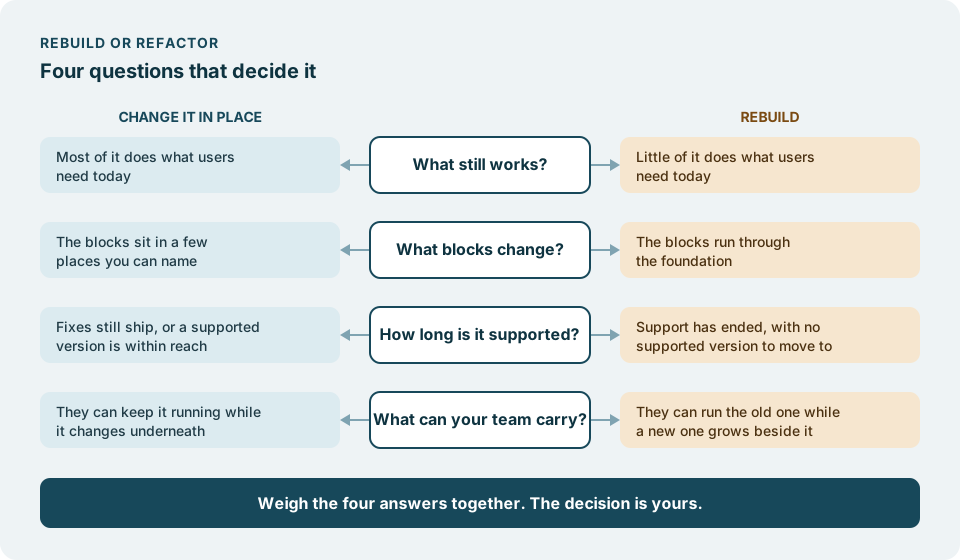
- Four questions decide which: what still works, what blocks change, how long the platform is supported, and what your team can carry.
- Neither path is the safe one by default. The right one is the one your answers point to.
Sooner or later, every product that has lived for a while reaches the same meeting. Something has become hard to change, and someone asks whether it would be better to start again. The room tends to split into two camps. One says the code is a mess and only a fresh start will fix it. The other says a rebuild is how good products get lost.
Both camps are sometimes right. The question is not which camp sounds wiser, but which situation you are in. This guide gives four questions that tell the two situations apart. Answer them honestly, and the decision usually makes itself.
What still works?
Start with what the product does well, not with what is wrong with it.
Ask the people who use it, not only the people who maintain it. Which journeys do customers rely on without thinking? Which screens does your support team never hear about? Which reports does finance trust? A product that quietly does most of its job is carrying a great deal of knowledge in its code, and much of that knowledge was never written down anywhere else.
If most of what users need still works, that weighs towards changing the product in place. You keep what is right and fix what is not. If little of it works, or the parts that work are the parts nobody needs any more, there is less to protect, and a rebuild loses less.
A rebuild has to carry over the behaviours nobody documented, and that is where rebuilds tend to go wrong. We wrote about it in Legacy rebuilds fail at the edges, so we will not repeat it here. Read it before you decide that little is worth keeping.
What blocks change?
Next, name the things that make change hard. Be specific: not “the code is old”, but “a change to pricing touches files all over the code” or “we cannot add a field to the customer record without breaking the export”.
Then look at where those blocks sit.
If they sit in a few places you can name, they can be dealt with one at a time while the rest of the product keeps working. That is the case for changing in place. If they run through the foundation, so that almost any change meets the same wall, then working around them one by one may never reach the end of the list. That is the case for a rebuild.
A useful test: if you fixed the three worst blocks, would the product feel different to the people who change it? If yes, you are probably looking at change in place. If the honest answer is “there would be three more behind them”, look harder at the other path.
How long is the platform supported?
Every framework and runtime has makers who decide how long they will publish fixes for each version, and they say so on their own pages. This is the one question in this guide with a date for an answer.
Two examples, each from the project’s own page. Vue’s own repository states that Vue 2 reached End of Life on 31 December 2023 and no longer receives new features, updates or fixes. The Node.js release schedule lists Node.js 20 as End-of-Life from 30 April 2026. Our framework end-of-life calendar gathers more of these dates, each linked to its source.
An end of support does not on its own decide between the two paths. What matters is what lies on the other side of it. If a newer, supported version of the same platform exists and the product can be brought to it, that is change in place: a large one, perhaps, but the product keeps its shape. If the platform itself has no supported future, or the step to the next version is so wide that little of the old code survives it, the line between upgrading and rebuilding has already blurred, and a rebuild deserves a fair look.
What can your team carry?
The last question is about people, and it is the one most often skipped.
Changing in place asks your team to keep the product running while it changes underneath them. Every change goes out to real users, so they need confidence in what they ship, and some way of knowing that what worked yesterday still works today.
Rebuilding asks something different. For a while there are two products: the old one, which still serves customers and still needs fixes, and the new one, growing beside it. Someone has to keep the old one standing, someone has to build the new one, and someone has to decide when the switch happens. A team that is already stretched by one product will feel two.
Neither is light. Ask which load your team can carry, alongside everything else on the roadmap.
Weigh the answers together
No single answer decides it. A product that mostly works, with blocks you can name, on a platform with a supported future, and a team that can carry steady change, points clearly to change in place. A product that mostly fails its users, blocked at the foundation, on a platform with nowhere to go, points to a rebuild. Most products fall somewhere between, and that is where the decision is yours to make, with the four answers in front of you.
Be wary of one argument in particular: that one path is quicker than the other. How long either takes depends on your product, not on the path, and anyone who tells you otherwise before they have looked is guessing.
Both paths, from our own record
We have walked both, and we can point to one of each.
Changed in place, for a customer we do not name, a Nordic B2B software company: Their web app was upgraded in its code base from Vue 2 to Vue 3.5 and Vuetify 4 in under six weeks, with more than 3,000 automated tests in place before the switch to Vue 3. That is the record of one product, not a forecast for yours.
Rebuilt: Spillvipps was rebuilt with Zefana.
Which path fits your product depends on your four answers, not on what we did for someone else.
Where we come in
If your answers point to a rebuild, what we can take on is described in Rebuild a legacy web application without losing what works. If they point the other way, Move off an ageing framework without stopping the product describes that path.
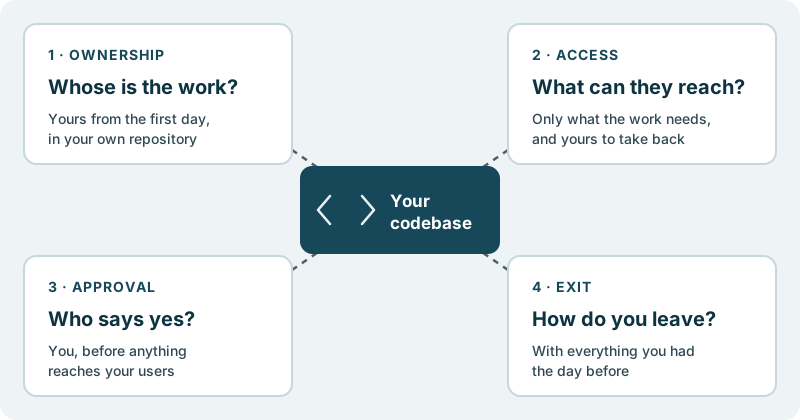
Your product keeps moving forward, week after week. The work lands in your own code repository. You decide what ships. Nothing reaches your users without your approval.
It starts with a conversation, with no obligation.