- Every framework and runtime your product stands on has a published date after which its makers stop fixing it.
- Past that date, a newly found security hole in that version stays open, and the people you hire inherit the gap.
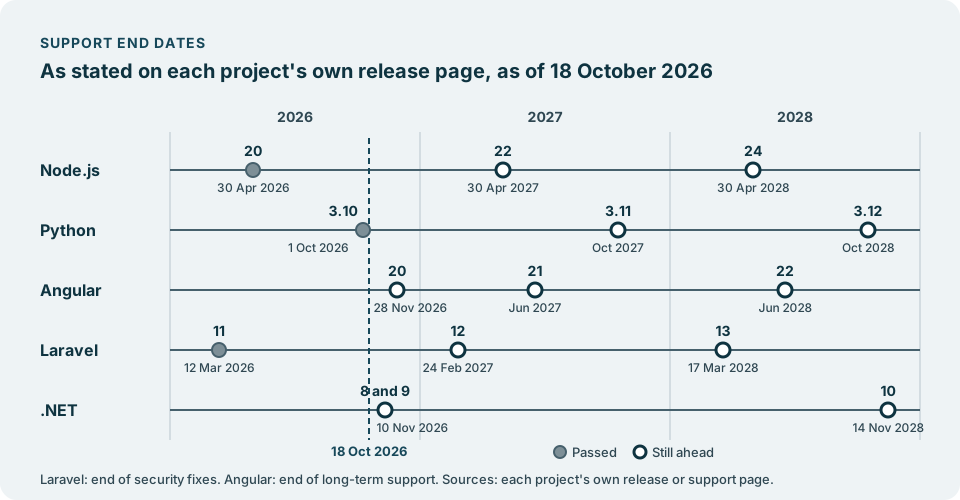
- The table below gives the dates for five widely used projects, as of 18 October 2026, each linked to the project’s own page.
Most product leaders know roughly how old their stack is. Fewer have the exact dates in front of them, and the dates are what decide when an upgrade stops being a choice. This is a calendar to read against your own list of what your product runs on. It is not a forecast: every date below is the one the project itself publishes, and you should open the linked page before you plan around it, because projects revise their own schedules.
What end of life means
End of life is the day a project stops releasing fixes for a version. The code keeps running. Nothing switches off. What stops is the flow of repairs.
Most projects step down in stages before that day. The Node.js release schedule moves a long-term release from Active LTS to Maintenance, where it gets critical bug fixes and security updates, and then to End-of-Life. The Python developer guide describes a security phase, in which only security fixes are accepted, followed by end of life, when the release cycle is frozen and no further changes are allowed. Laravel’s support policy gives each major version bug fixes for 18 months and security fixes for 2 years. Angular’s release page gives each major version 12 months of active support and 12 months of long-term support, in which only critical fixes and security patches are released.
So the date that matters most for risk is the last one: the day security fixes stop.
The calendar, as of 18 October 2026
Each date links to the page that states it. Where a page gives only a month, so does the table.
| Project | Version | Support ends | Status on 18 October 2026 |
|---|---|---|---|
| Node.js | 20 | 30 April 2026 | Ended |
| Node.js | 22 | 30 April 2027 | Maintenance LTS |
| Node.js | 24 | 30 April 2028 | Active LTS |
| Python | 3.10 | 1 October 2026 | Ended |
| Python | 3.11 | October 2027 | Security fixes only |
| Python | 3.12 | October 2028 | Security fixes only |
| Angular | 20 | 28 November 2026 | Long-term support |
| Angular | 21 | June 2027 | Long-term support |
| Angular | 22 | June 2028 | Active |
| Laravel | 11 | 12 March 2026 | Security fixes ended |
| Laravel | 12 | 24 February 2027 | Security fixes only |
| Laravel | 13 | 17 March 2028 | Bug and security fixes |
| .NET | 8 | 10 November 2026 | Maintenance |
| .NET | 9 | 10 November 2026 | Maintenance |
| .NET | 10 | 14 November 2028 | Active |
For Angular the date is the end of long-term support. For Laravel it is the end of security fixes; bug fixes stop earlier. For the others it is the date the project gives as end of life or end of support.
Reading the table
A few things in the table are easy to miss.
Two .NET versions end on the same day. On the .NET releases page, .NET 8 and .NET 9 both reach end of support on 10 November 2026. A product on either has the same deadline, and a move to .NET 10 serves both.
Some dates are months, not days. The Python developer guide gives only the month for versions still in support and says that dates shown in italic are scheduled and can be adjusted. Angular’s page gives months for its later versions. Read these as “during that month”, and check the page again as the month gets close.
Older versions are already gone. Angular’s page states that versions 2 to 19 are no longer supported. Node.js lists every release before 22 as End-of-Life on its release schedule. If you find one of those in your own list, the date in this table is not the one to plan around: that date has passed.
The table is a snapshot. It shows what each page stated on 18 October 2026. Pages change when projects release new versions or adjust their plans, so the linked page is always the authority, not this essay.
What it means for security fixes
Past end of life, the next security problem found in that version stays open. Projects fix vulnerabilities in the versions they still support. A version outside that window does not get the fix, even when the same flaw sits in its code.
That changes the conversation with your customers. A buyer’s security questionnaire may ask whether you run supported software. Before the date, the answer is yes. After it, the honest answer needs an explanation and a plan, and the plan is an upgrade that now has a deadline you did not choose.
It also changes what an upgrade costs. A version that is one step behind is usually a contained piece of work. A version that has sat past its end of life while the libraries around it moved on tends to need several steps at once, because the other packages your product uses stop supporting it too.
What it means for hiring
An unsupported framework is also a hiring question. Experienced engineers tend to prefer current tools, because that is where their skills keep their value and where the documentation, answers and libraries are being written. An old version narrows the pool of people who know it well and who want to keep working on it.
The people you already have feel it too. Time spent keeping an ageing version standing is time not spent on the product, and it can show up as slower features and as engineers who would rather work elsewhere.
None of this is a reason for panic. It is a reason to know the date and to decide, calmly and early, what you will do about it.
Put the dates on your own roadmap
The calendar only helps once it is matched against what your product actually runs.
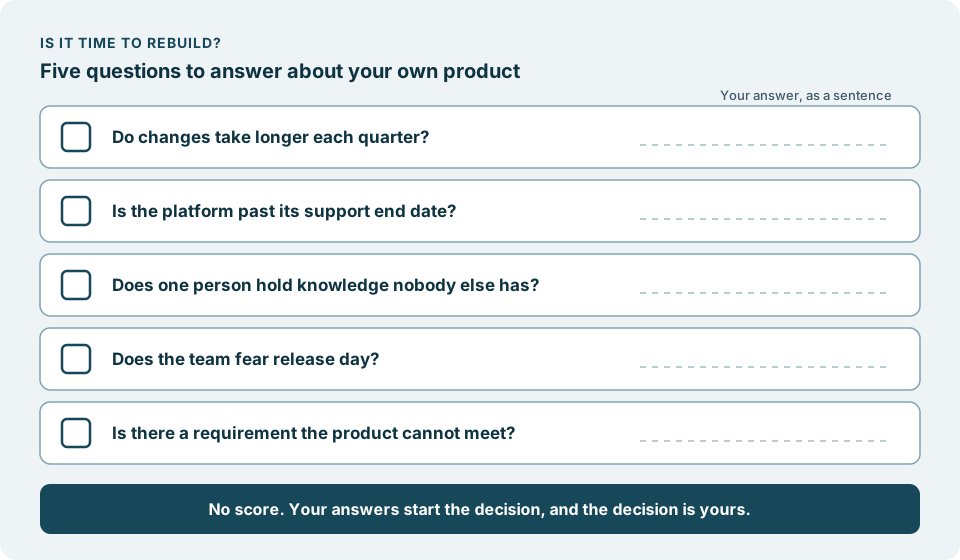
Make your own list. Ask your team for every framework and runtime in production, with the exact major version of each. Include the quiet ones: the admin tool, the scheduled job, the internal service nobody has touched in a while.
Write the date next to each line. Use the project’s own page, as this table does. If a project you use is not in this table, its own site will have a release or support page.
Decide, line by line. For each version, choose whether to upgrade, replace or retire it, and put that decision on the roadmap with an owner. A date you have planned for is a steady course. A date that arrives unplanned becomes an emergency.
Check again at each new major version. A new release is a natural moment to see whether a page has changed.
Where we come in
This calendar does not check anything for you, and nothing on this page tells you which of your systems are affected. Your list is yours to make.
When the list shows a framework at or near its end, the move is what we can take on, described in Move off an ageing framework without stopping the product. Your product keeps moving forward, week after week. We work within the access you grant, and nothing more. The work lands in your own code repository. You decide what ships. Nothing reaches your users without your approval.
It starts with a conversation, with no obligation.