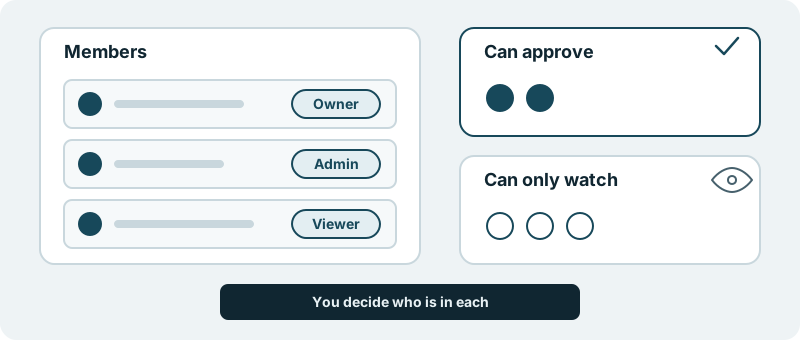
You bring your own people in. Each one is an owner, an admin or a viewer. You decide who can approve the work and who can only watch it move forward.
What you get
A product with the right people around it, each in the place you gave them.
Most leaders know the two ways this goes wrong. In the first, one person holds every decision, and the work waits whenever they are on a plane or in a board meeting. In the second, everyone can say yes to everything, and nobody is quite sure who signed off on the change that went out last week.
Roles settle that before it becomes a problem. You look at the people who care about the product and put each of them where they belong. Three things follow for you.
Your organisation, not ours. The people listed are the ones you invited. The roles they hold are the ones you gave them, so the list reads the way your organisation actually works.
Approval where you want it. You decide who can approve. A head of product and a lead engineer might both hold that, so a decision does not stall when one of them is away. Nothing reaches your users without your approval, and the approval comes from the people you chose for it.
Watching without signing off. Some people need to see the work without carrying the decision. They can follow along as people who watch, and nobody has to wonder whether a glance counts as a yes.
What it looks like in practice
Picture the week you start. You invite the two people who will steer the product with you and give them the roles that fit. You add your chief financial officer and a board member as people who watch. The list is short, and it shows who decides.
A few months later the team has grown. A new engineering lead joins, and you invite them in the role that matches the job. The shape you chose at the start still holds. The people who approve are the ones you trusted with it, and the people who watch can see the work without being asked to judge it.
For a product leader, it is a way to keep stakeholders close without turning every update into a vote.
What it is not
It is not single sign-on with your company directory. It is your list of people, in the three roles, with the approve-or-watch line drawn where you want it.
Start with one product, invite the two or three people who matter most, and see how the list reads.