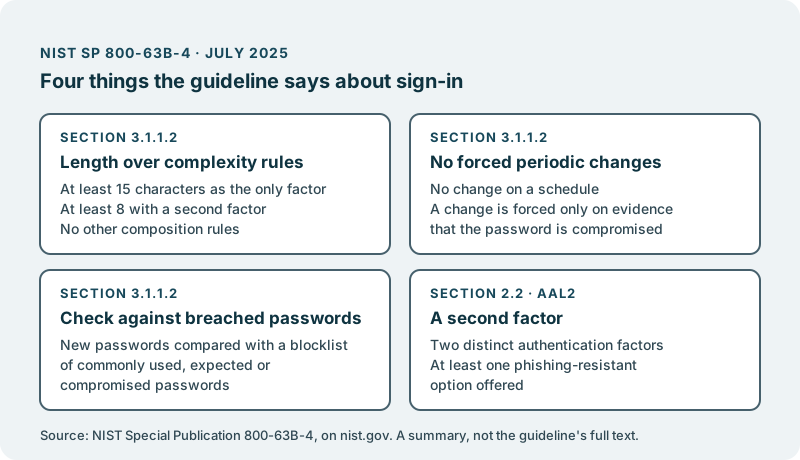
- NIST SP 800-63B-4 is the current revision, published in July 2025.
- It favours long passwords over composition rules, and drops forced periodic changes.
- It asks for checks against known-breached passwords, and for a second factor at level 2.
Special Publication 800-63B is the part of the US National Institute of Standards and Technology’s Digital Identity Guidelines that covers authentication: how a person proves, at sign-in, that they are the account holder. Its current revision is SP 800-63B-4, titled Digital Identity Guidelines: Authentication and Authenticator Management. NIST’s publication page dates it July 2025 and lists it as superseding the earlier SP 800-63B.
The guideline is written for US federal agencies, but its advice on passwords is also read outside government, and it may be the document a security reviewer has in mind when they ask how your product handles sign-in. Nothing below is legal or security advice, and nothing here says whether your product meets the guideline. Following it does not by itself make a product secure. What follows is what the text says, in plain terms, with the section linked next to each point. The full text is on NIST’s site, in HTML and as a PDF.
Length matters more than complexity rules
The guideline asks for long passwords and forbids the familiar rules about mixing character types.
Section 3.1.1.2, Password Verifiers, says a password used as the only factor must be at least 15 characters. A password used together with a second factor may be shorter, but at least eight characters. It says the maximum length permitted should be at least 64 characters, and that “Verifiers and CSPs SHALL NOT impose other composition rules”. That means no demand for an upper-case letter, a digit and a symbol.
The same section asks that the whole password is checked, not truncated, and that password managers, autofill and pasting are allowed. It also rules out password hints that someone who is not signed in can see, and prompts to use knowledge-based questions when choosing a password.
For a product leader, this is often the part where the product’s own sign-up form and the guideline disagree. A form that rejects a long phrase of plain words, or caps length at a low number, is asking for the opposite of what the text says.
No forced periodic changes
The guideline tells services to stop making people change their passwords on a schedule.
In section 3.1.1.2 the text is direct: “Verifiers and CSPs SHALL NOT require subscribers to change passwords periodically.” The exception is compromise. A change must be forced “if there is evidence that the authenticator has been compromised.”
If your product still expires passwords every few months, that is a policy someone chose at some point. It is worth asking who owns that choice now, and whether it was ever written down.
Checking new passwords against known-breached ones
When a person sets a password, the guideline asks that it is compared with a list of passwords that should not be used.
Section 3.1.1.2 calls this a blocklist, one “that contains known commonly used, expected, or compromised passwords”, and asks that the entire password is compared against it. If the password is on the list, the person is asked to choose another.
The guideline does not name a list or a service for this. Which list your team uses, and how it stays current, is a decision for them and for whoever is accountable for security in your company.
A second factor
At the guideline’s middle assurance level, a password alone is not enough.
Section 2.2 describes Authentication Assurance Level 2. Under Permitted Authenticator Types, authentication at this level “SHALL use either a multi-factor authenticator or a combination of two separate authentication factors.” Under Authenticator and Verifier Requirements, it adds that verifiers “SHALL offer at least one phishing-resistant authentication option at AAL2.”
Which assurance level fits your product is not something the guideline decides for you. It is a judgement about the risk of a wrong person getting into an account, and it belongs with the people who own that risk.
The questions a leader can ask their team
You do not need to read the whole guideline to know where you stand. A short conversation with your team will tell you most of it.
What is our minimum and maximum password length, and do we impose composition rules? Compare the answer with section 3.1.1.2. A short maximum or a rule about symbols is a quick thing to find.
Do we ever make people change their password on a schedule? If so, ask what that policy protects against, and whether a forced change on evidence of compromise would cover it.
Do we check new passwords against a blocklist? Ask which list, who keeps it current, and what a person sees when their choice is refused.
Can our users turn on a second factor, and is one of the options phishing-resistant? Ask also which accounts should be required to use one.
Can people paste passwords and use a password manager in our sign-in form? The guideline asks for both, and they are easy to break by accident.
Which assurance level have we decided we work to, and where is that written? A stated target lets your team say yes or no to a sign-in design before it is built.
Settle these once, and you can lift your eyes from the sign-in form back to the product it protects.
Where we come in
We do not certify, audit or assess products against the NIST guidelines, and we do not promise that following them makes a product secure. What we can do is take on the sign-in work you choose for your product, from a longer password limit to a second factor.
The work lands in your own code repository. The code we build for you is yours. You decide what ships. Nothing reaches your users without your approval.
It starts with a conversation, with no obligation. How security work for your product looks, before a customer’s questionnaire arrives, is set out in Harden security before the questionnaire arrives.