What changes for you
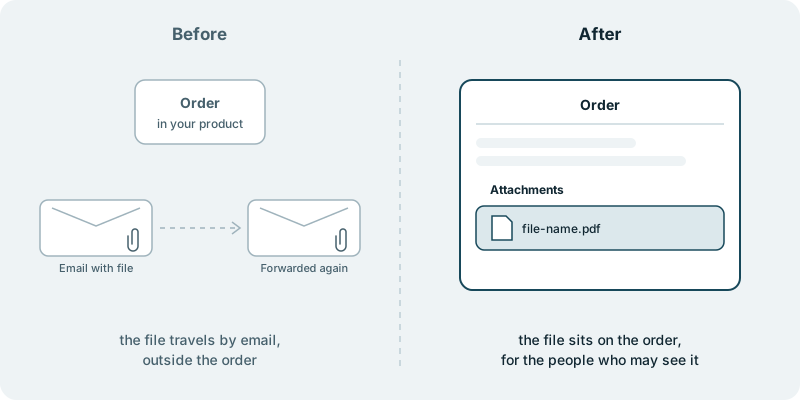
A customer of yours needs to hand over a signed form for an order. Your product has the order, but nowhere to put the form, so the customer emails it to their account manager. The account manager forwards it to the colleague who handles the order. A month later someone else opens the order, needs the form and cannot find it. It sits in two inboxes, and neither belongs to the person looking.
The same happens wherever a file belongs to a piece of work. A support case needs a document from the customer, and the document arrives by email. A colleague replies with a corrected version, and now there are two. Each file ends up outside the record it is about, and the record no longer tells the whole story.
Uploads on the record answer that inside your product. A user opens an order, a case or another record and adds a file to it. The file shows in a list of attachments on that record. The next person who opens the record finds the file where they expect it, next to the work it belongs to, without asking anyone to forward it.
Sharing follows the record. A file attached to one customer’s order is there for the people who may see that order, and for no one else. Your users share a file with the right colleagues by putting it on the record they already share, rather than by choosing whom to email.
Your product becomes the place where a record and its files live together, rather than the place people leave to send them.
What you decide
You decide which records can hold files. Orders and cases are typical examples, but the list is yours, based on where your users exchange files today.
You decide who may add a file and who may see it. Those rights can follow the roles each customer’s admin already manages, covered in giving your customers’ admins control of their own users. A file on one customer’s record is for that customer’s people, and you decide where that line sits.
You decide which kinds of files are welcome, based on what your users actually send, and how the attachments list looks on the record so it reads as part of the screen your users already know.
If your users also discuss a record, comments and files can sit side by side, as described in letting your users discuss the work where it happens. Each is its own piece of work, and you choose the order.
You decide what ships. Nothing reaches your users without your approval.
What you see along the way
You see uploads take shape in your repository, as small changes your team can read and approve. A choice that is yours, such as who may see a file on a shared record, reaches you with the question and a link.
What it costs you in time
A first conversation about which records gather files today, who sends them and where those files end up now. After that, a little time from the person who handles the most forwarded attachments, often in support or account management. They know which files keep arriving by email and who needs them, and that knowledge shapes uploads your users recognise as theirs.
What if you want to stop
Because the code is yours, your own developers or another team can take the uploads further.
Starting small
A sensible first piece covers one kind of record whose files people email most, such as orders, with uploads to that record and the files visible to the people who may see it. That shows whether your users bring their files into your product before you decide what comes next. Every engagement is tailored to your product and your goals. It starts with a conversation, with no obligation.