What changes for you
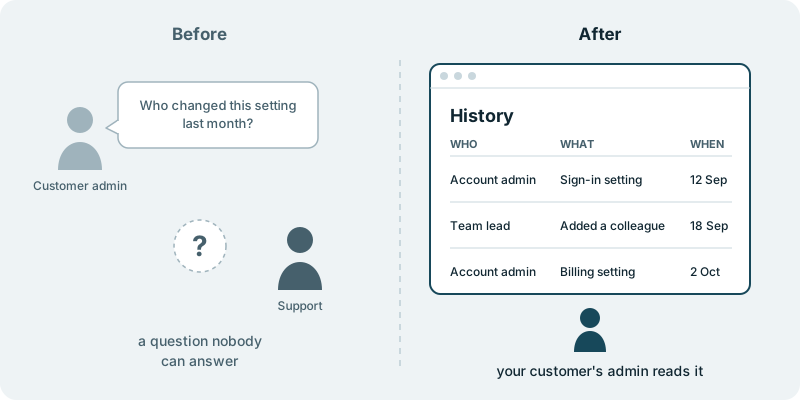
An enterprise customer writes in with a plain question. A setting in their account is different from what they expected, something has gone wrong because of it, and they want to know who changed it and when. Your support team looks, and there is no good answer. Someone may have made the change on the customer’s side, or it may have been a colleague on yours, and the product does not say.
That gap costs more than one awkward reply. The customer cannot settle the matter inside their own organisation, so the question comes back, sometimes with more people copied in. Your team spends time reconstructing what happened from memory and guesswork. For a larger customer, an answer of “we cannot tell” also sits uneasily with the trust they placed in your product when they signed.
A history inside your product changes the answer. Each customer’s admin opens a page in their own account and reads a short list: who made a change, what they changed and when. The question that used to become a support thread now has an answer the customer can find without asking you.
Your support team gets out of the business of guessing. Your customers get a clear view of what happens in their own account, in the product they already use. When the next customer asks who changed a setting, the answer is already on a page they can open.
What you decide
You decide which changes appear. Settings, access and billing are the usual starting points, because those are what customers ask about. Where the list starts and how far it reaches is your call, based on what your customers actually need to see.
You decide who may read the history inside each customer. Often that is the same admin who looks after their people, as described in giving your customers’ admins control of their own users. If your customers sign in with their company login, as in adding single sign-on for your enterprise customers, you decide how a person appears in the list so their admin recognises them.
You decide how the page reads and where it sits in your product, so it looks like part of what customers already use. You also decide how to tell customers about it, whether that is a note to the customer who asked or a mention to your larger accounts. You decide what ships. Nothing reaches your users without your approval.
This history belongs to your product and your customers. It shows what people do in their own accounts, and it is separate from anything your own team uses to look after the product.
What you see along the way
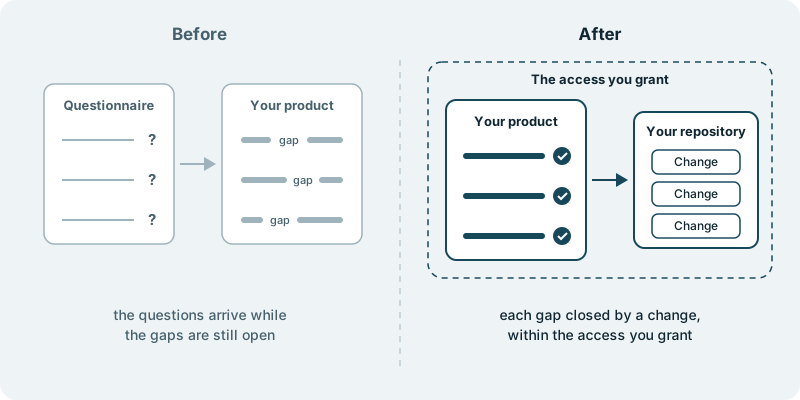
You see the history page take shape in your repository, as small changes your team can read and approve. A choice that is yours, such as how a change is worded in the list, reaches you with the question and a link.
What it costs you in time
A first conversation about the questions customers send today, which changes they concern and who usually asks. After that, a little time from the person on your team who answers those questions now. They know which customers ask, what they want to see and which answers would have settled the matter, and that knowledge shapes a list an admin can read at a glance.
What if you want to stop
The parts you have approved stay in your repository, and your product keeps working as it did before. Customers who ask your support team who changed something can still do so. Your code is yours to keep, change or hand to another team.
Starting small
A sensible first piece covers the one area customers ask about most, such as their account settings, with who, what and when for each change there. That shows whether the questions ease before you decide what comes next. Every engagement is tailored to your product and your goals. It starts with a conversation, with no obligation.