What changes for you
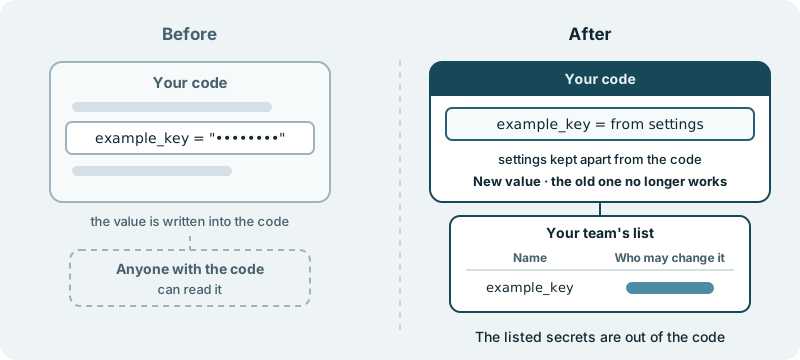
The passwords, access keys and other secrets your team lists come out of your code and settings files. Each one moves into settings kept apart from the code, each gets a new value so the old one stops working, and your team gets a short list of each secret’s name and who may change it.
Today those secrets are written into the code itself. A database password sits in a settings file next to the code that uses it. An access key for an outside service is pasted into a line of code. Everyone with access to the code can read them: each developer, each contractor, anyone who has been given a copy. When someone leaves your team, the values they could read are still the values in use, and nothing in the code tells you who has seen which.
With this change, the secrets on your team’s list are no longer written in the code. The code still reaches the same services; it simply stops carrying the values. Moving a value is not enough on its own, though, because the old one has been readable for as long as it sat in the code. So each listed secret is replaced with a new value, and the old one stops working. A copy of the code taken before the change still shows the old values, but they no longer open anything.
Your team also gets a short list: the name of each secret that moved, and who may change it.
Moving the listed secrets, giving each a new value, and the list: that is the scope of this page.
What this page does not promise
It does not promise that every secret in your code has been found. The work follows the list your team gives, and only that list. Your team knows which passwords and keys the product depends on, and the list is how that knowledge reaches the work.
It does not clean your code’s history either. Earlier versions of the code still hold the old values as they were written. The new value for each listed secret is what makes those old copies harmless.
Keeping new secrets from reaching your repository from here on is a separate ability, described on secrets never leave in a commit. This page is about the ones already in your code.
What you decide
You decide which secrets move. The list your team gives is the list the work follows, and you can add to it or take a secret off it.
You decide who may change each secret, and the names go on your team’s list.
You decide what ships. Nothing reaches your users without your approval.
What you see along the way
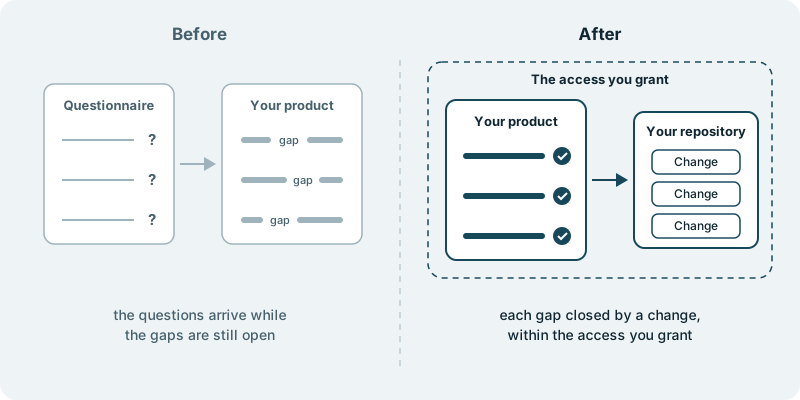
The work lands in your own code repository, as changes your team can open and read in full. Your team can look at the places where a listed secret used to be written and see that the value is gone from the current code. We work within the access you grant, and nothing more.
The list of names, with who may change each one, is your team’s to keep and to update.
What it costs you in time
A first conversation about the passwords and keys your team knows of, and which parts of the product use each one. After that, some time from whoever looks after those secrets today, to confirm the list and to name who may change each one.
What if you want to stop
Whatever your team has approved by then stays in your repository, and the secrets already moved keep their new values. The code we build for you is yours. Your code and your product stay yours to take anywhere.
Starting small
We have not done this work in a customer’s code before, and we will not suggest otherwise. A sensible first piece is a single secret from your team’s list: moved out of the code, given a new value, and written on the list with who may change it. Every engagement is tailored to your product and your goals. It starts with a conversation, with no obligation.