What changes for you
An enterprise customer reaches the end of a sales conversation and raises one more point. In your product today, one person on their side can send a payment, publish a page or place a large order, and it takes effect. Their own rules say a second person should approve actions like these first. Until your product can do that, the deal waits, or the customer works around it with emails and screenshots outside your product.
The same request tends to come from customers you already have. A finance lead wants a colleague to approve payments. A marketing team wants someone to approve a page before it goes public. A purchasing team wants a second name on large orders. Each one is reasonable, and each one ends up as a message to your support team asking whether the product can do it.
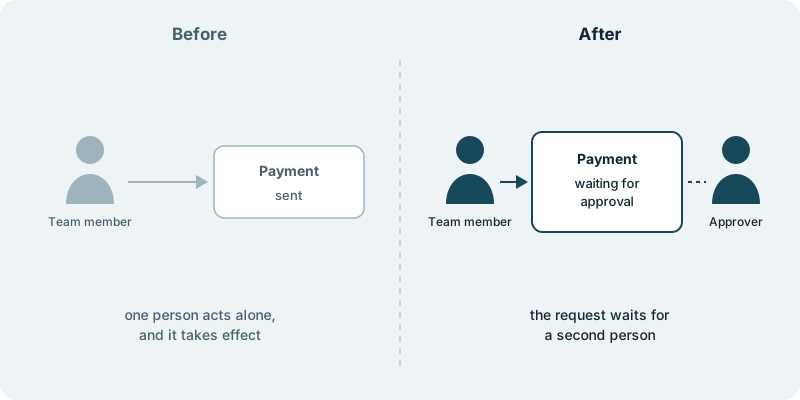
An approval step answers that request inside your product. Each customer chooses which actions need approval. When someone on their side takes one of those actions, it does not take effect yet. It waits as a request until a second person at that customer approves it, and then it goes through. Actions the customer has not chosen work exactly as they do now.
Your sales team gets a clear answer to a question that used to stall a deal. Your customers keep the rule they already follow, in the product they already use, rather than around it.
What you decide
You decide which actions can carry an approval step. Payments, published pages and large orders are typical examples, but the list is yours, based on what your customers ask for. Each customer then chooses, from that list, the actions they want approved.
You decide who may approve at each customer. Often that follows the roles their admin already sets, as described in giving your customers’ admins control of their own users. If your customers sign in with their company login, as in adding single sign-on for your enterprise customers, you decide how the requester and the approver appear, so their colleagues recognise them.
You decide how a waiting request looks to the person who asked and to the person who approves, and where it sits in your product, so it reads as part of what customers already use. You also decide how to tell customers about it, whether that is a note to the prospect who raised it or a mention to your larger accounts.
You decide what ships. Nothing reaches your users without your approval. That is your approval of the work on your product, and it is separate from the step your customers use among themselves.
What you see along the way
You see the approval step take shape in your repository, as small changes your team can read and approve. A choice that is yours, such as how a waiting request is worded, reaches you with the question and a link.
What it costs you in time
A first conversation about who is asking, which actions they mean and what their own rule says. After that, a little time from the person who hears these requests now, often in sales or customer success. They know which customers raised it and which action came up first, and that knowledge shapes a step customers recognise as their own rule.
What if you want to stop
Customers who have not chosen any actions see no difference. The approval step is code you own, so your own team or another one can carry it on.
Starting small
A sensible first piece covers one action that customers ask about most, such as payments, with one approval by a second person at the same customer. That shows whether the request stops coming up before you decide what comes next. Every engagement is tailored to your product and your goals. It starts with a conversation, with no obligation.