What changes for you
Sign-in stops depending on something your users must remember. Today a returning user looks at the password field, tries the one they use on every other site, then a variation of it, then asks for a reset. Some give up there. Others write to support, and someone on your team spends part of their week helping people back into their own accounts.
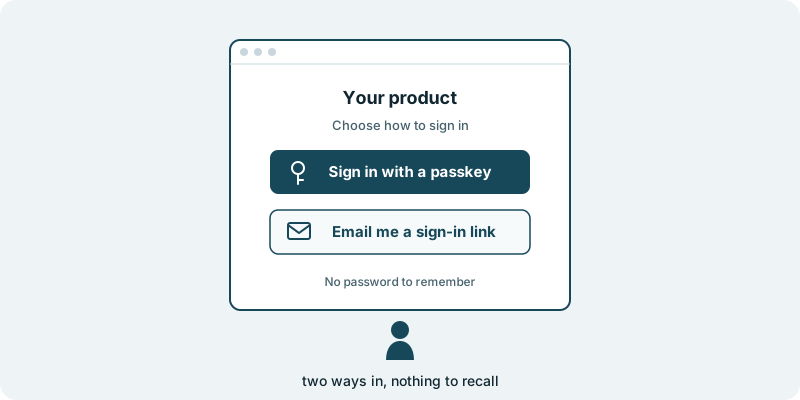
With sign-in without a password, your sign-in screen offers two ways in. A user can sign in with a passkey, with nothing to type from memory. Or they can ask for a one-time link sent to their email address, open it and arrive in your product. Neither way asks them to recall anything.
Passkeys rest on an open standard, the Web Authentication specification published by the W3C. The standard is public, and your team can read it for themselves.
The password does not have to disappear on the first day. It stays as a fallback beside the two new ways in, for as long as you choose. People who are used to typing it can carry on while others move across, and you decide when, or whether, it goes.
For you, the change is a sign-in that no longer rests on how well people remember. A user who returns after months away has a way in that does not begin with a reset.
This page is about how your users get in without a password. If a customer’s security review asked for a step after the password, Give your users a second step at sign-in covers that. If your login was written in-house years ago and nobody quite trusts it, Replace the sign-in you built yourself is the place to begin. If a large customer wants its staff to use their company login, that is Add single sign-on for your enterprise customers. The work lands in your own code repository. The code we build for you is yours.
What you decide
You decide which ways in your users are offered. Some products offer the passkey and the emailed link together from the start. Others begin with one of them and add the second once users have found their footing.
You decide how long the password stays. It can remain as a quiet fallback, or you can pick a moment to retire it once you are comfortable. That call can wait until you have watched how your users take to the new choices.
You decide how the two choices are worded on your sign-in screen. Someone meeting a passkey for the first time reads a sentence or two before deciding, and that sentence belongs in your product’s voice, not ours. The same goes for the email that carries the link: it reads as a message from your product, in your words.
You decide who on your side answers when someone still cannot get in. The people who handle your users’ sign-in questions today know where people stumble, and their view shapes the wording around both choices.
You also decide how far into your product we can reach. We work within the access you grant, and nothing more.
You decide what ships. Nothing reaches your users without your approval.
What you see along the way
The new sign-in arrives in your repository as changes your team can read before anything is approved. When a choice is yours, such as the words a user reads before creating a passkey, it comes to you by email with the question and a link.
You see the two choices on your own sign-in screen, beside the password your users know today. Nothing about the fallback changes unless you decide it should.
What it costs you in time
A first conversation about how people sign in to your product today, where they get stuck, and which of the two ways in matters most to you. After that, some time from whoever answers your users when they are locked out, and a decision about the password fallback whenever you are ready to make it.
What if you want to stop
What you approved stays in your repository, including the password fallback, so your users keep a way in. Your code and your product stay yours to take anywhere.
Starting small
A sensible first piece is the emailed one-time link beside the password your users already have, so you can see how they take to signing in without one before passkeys join it. Every engagement is tailored to your product and your goals. It starts with a conversation, with no obligation.